Automatic Backup
Save completed tournaments automatically — locally and to a remote instance.
Overview
NewTon is offline-first — everything is stored locally in your browser. This works brilliantly for running tournaments without an internet connection, but it means tournament data lives on one machine.
Automatic Backup bridges the gap:
- Local backup — when a tournament is finalized, the complete tournament data is saved to the server as a JSON file. No button to click, no export to remember. It happens silently at the moment of completion.
- Remote backup — optionally, the same data is uploaded to a second instance at the same time. Tournaments run locally, but results are available online immediately.
- Immediately available — saved tournaments appear in Analytics for all users, on any device. The moment a tournament is finalized, everyone can see the results.
Use Case
Here is how our club uses it:
At the venue, we have a dedicated computer for the Tournament Manager. It comes out for each tournament, then goes back in the storage locker. Internet at the venue is spotty, so we rely on the offline functionality — the Tournament Manager runs without a connection.
At the end of a tournament, whatever internet connection we have is enough to upload the completed tournament to our online instance. This instance runs in Analytics Mode — a read-only view of all tournament data.
Once uploaded, anyone can open the online instance on their phone and access the full stats — cross-tournament leaderboard, player rankings, match history, achievements — all from their pocket.
Local Backup
When Automatically backup tournaments on completion is enabled, finalizing a tournament saves the complete tournament data as a JSON file to the server’s persistent storage (as configured in your Docker Compose volume mounts).
Saved tournaments appear in Shared Tournaments for all visitors on that instance. They can be imported to Recent Tournaments manually. Analytics picks them up automatically — every completed tournament becomes part of the cross-tournament statistics for everyone who visits the site.
Duplicate protection is built in — uploading a tournament that already exists on the server will not overwrite the existing copy.
Remote Backup
In addition to the local backup, tournaments can be uploaded to a second instance at the moment of completion. The venue computer saves locally and pushes to the online Analytics instance in one step.
The upload happens immediately. If there is no internet connection at that moment, the upload will not succeed — use the manual fallback instead.
The receiving instance needs NEWTON_API_ENABLED=true in its Docker configuration. Authentication is handled via basic auth (htaccess). No other configuration is required on the receiving end.
Setup
In Global Settings, scroll to Server Settings:
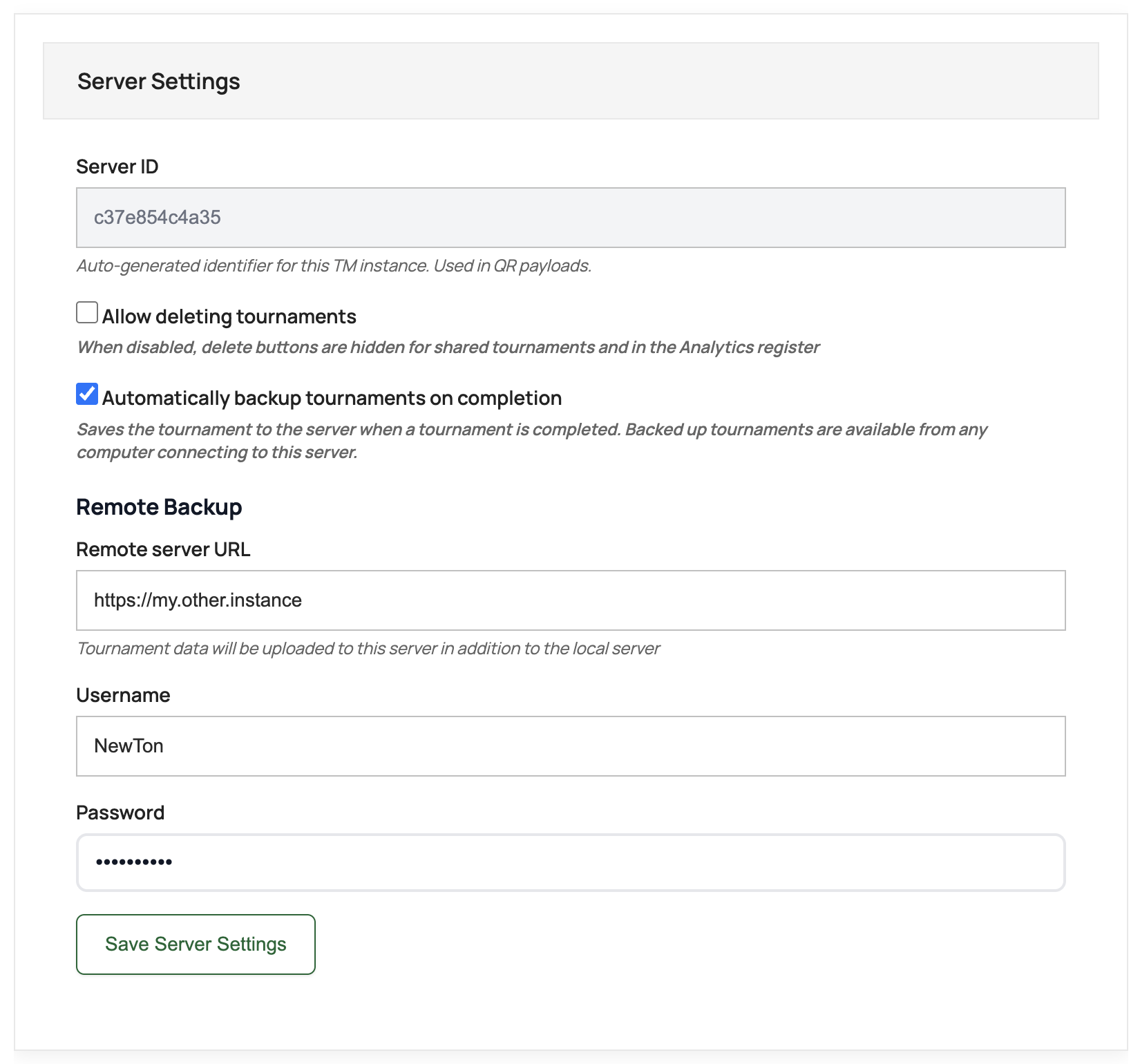
- Tick Automatically backup tournaments on completion. This enables the local backup.
- For remote backup, fill in the Remote Backup fields:
- Remote server URL — the full URL of the receiving instance (e.g.
https://my.other.instance) - Username and Password — basic auth credentials for the remote instance
- Remote server URL — the full URL of the receiving instance (e.g.
- Click Save Server Settings.
That’s it. The next time a tournament is finalized, it will be saved locally and uploaded to the remote instance automatically.
Analytics Mode
The remote instance is typically configured with NEWTON_MODE=analytics in Docker. In Analytics Mode:
- The full Tournament Manager interface is hidden — visitors see only Analytics.
- Data is read-only. No tournaments can be created or modified through the UI. Tournament JSON files can still be imported via Analytics.
- All uploaded tournaments appear automatically in the cross-tournament statistics.
- The leaderboard, player rankings, match history, and achievements are all available.
- Works on mobile — designed to be checked from your phone.
See the Docker Quick Start for environment variable reference.
Manual Fallback
If the internet connection is unavailable at the moment of tournament completion, the remote upload will not succeed. In that case:
- Export the tournament as a JSON file from the Tournament Manager (Recent Tournaments → Export).
- Upload the JSON file to the Analytics instance manually (Analytics → Import).
Manually imported tournaments are also added to Shared Tournaments on the receiving instance, just like automatic uploads. The same duplicate protection applies.
The local backup still happens regardless of internet connectivity — only the remote upload is affected.
Requirements
- Docker — automatic backup is a server-side feature. It requires the Docker installation.
NEWTON_API_ENABLED=true— the API must be enabled on both the sending and receiving instances.- Persistent storage — configure volume mounts in Docker Compose so saved tournaments survive container restarts.
- Basic auth (optional) — recommended for the remote instance to prevent unauthorized uploads.
NewTon DC Tournament Manager — offline at the oche, online for everyone else.